


JuanDRomero
Eta
SEO
Verificación en dos pasos activada
Hola a todos,
Primero aclaro que esto no es algo inventado hecho por mí, fue donado por uno de mis colaboradores a mi pagina y como resulto súper sencillo hacerlo ademas que siempre he querido tener el Pop Up de Me gusta para Facebook me pareció genial compartirlo con ustedes, siempre busque el Pop up para facebook pero todos los métodos que existían eran en PHP y como Blogger no permite esto pues malo... ahora resulta que si se puede hacer con JQuery.
Este lo agrego como tutorial porque sé que es muy solicitado por los propietarios de blogs en blogger.
Pasos para agregarlo:
Vamos a: Diseño / Elementos de la página / HTML/Javascript:
DEBEN CAMBIAR http%3A%2F%2Fwww.facebook.com%2Fpages%2FEstatriste%2F186903574749125%3F por el link de su FANS PAGE
Bueno espero que les sea de utilidad. cualquier cosa no duden en comentar y con mucho gusto los ayudo.
Saludos
Primero aclaro que esto no es algo inventado hecho por mí, fue donado por uno de mis colaboradores a mi pagina y como resulto súper sencillo hacerlo ademas que siempre he querido tener el Pop Up de Me gusta para Facebook me pareció genial compartirlo con ustedes, siempre busque el Pop up para facebook pero todos los métodos que existían eran en PHP y como Blogger no permite esto pues malo... ahora resulta que si se puede hacer con JQuery.
Este lo agrego como tutorial porque sé que es muy solicitado por los propietarios de blogs en blogger.
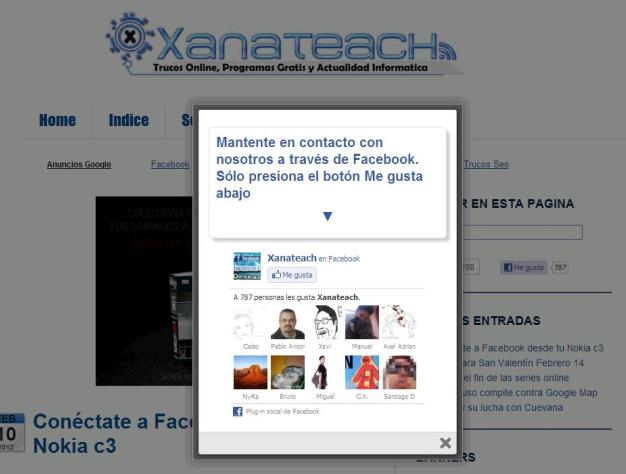
Pasos para agregarlo:
Vamos a: Diseño / Elementos de la página / HTML/Javascript:
HTML:
<style>
/*
ColorBox Core Style:
The following CSS is consistent between example themes and should not be altered.
*/
#colorbox, #cboxOverlay, #cboxWrapper{position:absolute; top:0; left:0; z-index:9999; overflow:hidden;}
#cboxOverlay{position:fixed; width:100%; height:100%;}
#cboxMiddleLeft, #cboxBottomLeft{clear:left;}
#cboxContent{position:relative;}
#cboxLoadedContent{overflow:auto;}
#cboxTitle{margin:0;}
#cboxLoadingOverlay, #cboxLoadingGraphic{position:absolute; top:0; left:0; width:100%;}
#cboxPrevious, #cboxNext, #cboxClose, #cboxSlideshow{cursor:pointer;}
.cboxPhoto{float:left; margin:auto; border:0; display:block;}
.cboxIframe{width:100%; height:100%; display:block; border:0;}
/*
User Style:
Change the following styles to modify the appearance of ColorBox. They are
ordered & tabbed in a way that represents the nesting of the generated HTML.
*/
#cboxOverlay{background:#000;opacity:0.5 !important;}
#colorbox{
box-shadow:0 0 15px rgba(0,0,0,0.4);
-moz-box-shadow:0 0 15px rgba(0,0,0,0.4);
-webkit-box-shadow:0 0 15px rgba(0,0,0,0.4);
}
#cboxTopLeft{width:14px; height:14px; background:url(http://1.bp.blogspot.com/-FiJ_Xz7txE...0/controls.png) no-repeat 0 0;}
#cboxTopCenter{height:14px; background:url(http://1.bp.blogspot.com/-TcJGMnSfOC...600/border.png) repeat-x top left;}
#cboxTopRight{width:14px; height:14px; background:url(http://1.bp.blogspot.com/-FiJ_Xz7txE...0/controls.png) no-repeat -36px 0;}
#cboxBottomLeft{width:14px; height:43px; background:url(http://1.bp.blogspot.com/-FiJ_Xz7txE...0/controls.png) no-repeat 0 -32px;}
#cboxBottomCenter{height:43px; background:url(http://1.bp.blogspot.com/-TcJGMnSfOC...600/border.png) repeat-x bottom left;}
#cboxBottomRight{width:14px; height:43px; background:url(http://1.bp.blogspot.com/-FiJ_Xz7txE...0/controls.png) no-repeat -36px -32px;}
#cboxMiddleLeft{width:14px; background:url(http://1.bp.blogspot.com/-FiJ_Xz7txE...0/controls.png) repeat-y -175px 0;}
#cboxMiddleRight{width:14px; background:url(http://1.bp.blogspot.com/-FiJ_Xz7txE...0/controls.png) repeat-y -211px 0;}
#cboxContent{background:#fff; overflow:visible;}
#cboxLoadedContent{margin-bottom:5px;}
#cboxLoadingOverlay{background:url(http://1.bp.blogspot.com/-PPvu-446sn...background.png) no-repeat center center;}
#cboxLoadingGraphic{background:url(http://1.bp.blogspot.com/-31strss_1-...00/loading.gif) no-repeat center center;}
#cboxTitle{position:absolute; bottom:-25px; left:0; text-align:center; width:100%; font-weight:bold; color:#7C7C7C;}
#cboxCurrent{position:absolute; bottom:-25px; left:58px; font-weight:bold; color:#7C7C7C;}
#cboxPrevious, #cboxNext, #cboxClose, #cboxSlideshow{position:absolute; bottom:-29px; background:url(http://1.bp.blogspot.com/-FiJ_Xz7txE...0/controls.png) no-repeat 0px 0px; width:23px; height:23px; text-indent:-9999px;}
#cboxPrevious{left:0px; background-position: -51px -25px;}
#cboxPrevious.hover{background-position:-51px 0px;}
#cboxNext{left:27px; background-position:-75px -25px;}
#cboxNext.hover{background-position:-75px 0px;}
#cboxClose{right:0; background-position:-100px -25px;}
#cboxClose.hover{background-position:-100px 0px;}
.cboxSlideshow_on #cboxSlideshow{background-position:-125px 0px; right:27px;}
.cboxSlideshow_on #cboxSlideshow.hover{background-position:-150px 0px;}
.cboxSlideshow_off #cboxSlideshow{background-position:-150px -25px; right:27px;}
.cboxSlideshow_off #cboxSlideshow.hover{background-position:-125px 0px;}
/*-----------------------------------------------------------------------------------*/
/* Facebook Likebox popup For Blogger
/*-----------------------------------------------------------------------------------*/
#subscribe {
font: 12px/1.2 Arial,Helvetica,san-serif; color:#666;
}
#subscribe a,
#subscribe a:hover,
#subscribe a:visited {
text-decoration:none;
}
.box-title {
color: #3B5998;
font-size: 20px !important;
font-weight: bold;
margin: 10px 0;
border:1px solid #ddd;
-moz-border-radius:6px;
-webkit-border-radius:6px;
border-radius:6px;
box-shadow: 5px 5px 5px #CCCCCC;
padding:10px;
line-height:25px; font-family:arial !important;
}
.box-tagline {
color: #999;
margin: 0;
text-align: center;
}
#subs-container {
padding: 35px 0 30px 0;
position: relative;
}
a:link, a:visited {
border:none;
}
.demo {
display:none;
}
</style>
<script src='https://ajax.googleapis.com/ajax/libs/jquery/1.7.1/jquery.min.js'></script>
<script src="http://yourjavascript.com/11215013191/jquery.colorbox-min.js"></script>
<script type="text/javascript">
jQuery(document).ready(function(){
if (document.cookie.indexOf('visited=true') == -1) {
var fifteenDays = 1000*60*60*24*30;
var expires = new Date((new Date()).valueOf() + fifteenDays);
document.cookie = "visited=true;expires=" + expires.toUTCString();
$.colorbox({width:"400px", inline:true, href:"#subscribe"});
}
});
</script>
<!-- This contains the hidden content for inline calls -->
<div style='display:none'>
<div id='subscribe' style='padding:10px; background:#fff;'>
<h3 class="box-title">Mantente en contacto con nosotros a través de Facebook. Sólo presiona el botón Me gusta <center><p style="line-height:3px;" >▼</p></center></h3>
<center>
<iframe src="//www.facebook.com/plugins/likebox.php?href=http%3A%2F%2Fwww.facebook.com%2Fpages%2FEstatriste%2F186903574749125%3F&width=300&colorscheme=light&show_face s=true&border_color=%23ffffff&stream=false &header=false&height=258" scrolling="no" frameborder="0" style="border:none; overflow:hidden; width:300px; height:258px;" allowtransparency="true"></iframe>
</center>
</div>
</div>DEBEN CAMBIAR http%3A%2F%2Fwww.facebook.com%2Fpages%2FEstatriste%2F186903574749125%3F por el link de su FANS PAGE
Bueno espero que les sea de utilidad. cualquier cosa no duden en comentar y con mucho gusto los ayudo.
Saludos
Última edición:



