Ampliar largura do primeiro post na index.php

  • Autor Autor eic2010
  • Data de início Data de início
Tradução em andamento: em alguns minutos este tópico estará em português. Por enquanto, o conteúdo está no original em espanhol. Ver original
E

eic2010

Beta
Usuário com poucas negociações! Use sempre o saldo do ForoBeta!
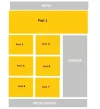
Hola quisiera saber si se puede mostrar el primer post mas ancho

Asi lo tengo :
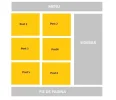
asi lo tengo.webp


Asi quisiera mostrarlo :

asi quisiera.webp


y asi es mi codigo en el index.php

PHP:
<?php get_header(); ?>
<main class="wrap">
  <section class="content-area content-thin">
<?php if ( have_posts() ) : while ( have_posts() ) : the_post(); ?>
      <article class="article-loop">
        <header>
			<?php 	if ( has_post_thumbnail() ) { ?>
		<div class='post-thumb'>
				<a href="<?php the_permalink();?>" >
				<?php the_post_thumbnail(''); ?>
				</a>
		</div>
			<?php the_category(); ?>
          <h2><a href="<?php the_permalink(); ?>" title="<?php the_title_attribute(); ?>"><?php the_title(); ?></a></h2>      
        </header>    
	<?php } ?>
      </article>
<?php endwhile; else : ?>
      <article>
        <p>Sorry, no posts were found!</p>
      </article>
<?php endif; ?>
  </section><?php get_sidebar(); ?>
</main>
<?php get_footer(); ?>

desde ya gracias a todos
 
Foi útil? Participe da conversa

Com sua conta grátis você pode responder, mandar mensagem privada ao autor e comprar com Saldo retido: o pagamento é liberado quando você recebe o combinado.

Leva 30 segundos · você volta a este tópico ao terminar
Amigo básicamente eso es CSS. Si tu plantilla maneja algún framework CSS por ejemplo Bootstrap es muy sencillo sino tienes que jugar un poco con el atributo width de ese primer post que se encuentra en el ciclo del while. Si necesitas apoyo me envías un MP :encouragement: Saludos.
 
me párese interesante el tema
 
Sigo el tema quiero aprender 😱
 
si llego a encontrar la forma lo publico hace tiempo que busco ya googlee por todos lados pero nada
 
Mira hace lo siguiente:


En el siguiente código, lo que estarías haciendo es al "Primer (1)" se muestra de la manera que vos le declares el estilo o estructura.

PHP:
<?php if (have_posts()) : ?>
<?php $count = 0; ?>
<?php while (have_posts()) : the_post(); ?>
<?php $count++; ?>
<?php if ($count == 1) : ?>

<!-- Aca tendrias que poner el diseño que sea mas ancho. -->
 <article class="article-loop"> 
        <header> 
            <?php     if ( has_post_thumbnail() ) { ?> 
        <div class='post-thumb'> 
                <a href="<?php the_permalink();?>" > 
                <?php the_post_thumbnail(''); ?> 
                </a> 
        </div> 
            <?php the_category(); ?> 
          <h2><a href="<?php the_permalink(); ?>" title="<?php the_title_attribute(); ?>"><?php the_title(); ?></a></h2>       
        </header>     
    <?php } ?> 
      </article> 


<?php else : ?>
 
<!-- Aca el que ya tenes -->

 <article class="article-loop"> 
        <header> 
            <?php     if ( has_post_thumbnail() ) { ?> 
        <div class='post-thumb'> 
                <a href="<?php the_permalink();?>" > 
                <?php the_post_thumbnail(''); ?> 
                </a> 
        </div> 
            <?php the_category(); ?> 
          <h2><a href="<?php the_permalink(); ?>" title="<?php the_title_attribute(); ?>"><?php the_title(); ?></a></h2>       
        </header>     
    <?php } ?> 
      </article> 


  <?php endif; ?>
<?php endwhile; else : ?> 
      <article> 
        <p>Sorry, no posts were found!</p> 
      </article> 
<?php endif; ?>
 
Última edição:
No necesitas tocar para nada la vista php, solo tienes que usar :first-child o :nth-child(1)
 
Muchas gracias tavostrog y denzel ambos me sirvieron 🙂
 
Voltar
Topo