

alexan1252
Gamma
Usuário com poucas negociações! Use sempre o saldo do ForoBeta!
Olá amigos.
Depois de um bom tempo sem operar o software vBulletin, decidi começar a operá-lo novamente e comprei o vBulletin 5. Começo dizendo isso pelo fato de não ser tão novato; sei como instalar o vBulletin perfeitamente, pois no passado fazia isso constantemente.
Agora não sei se algo mudou na configuração do config.php. Eu renomeei o config.php.new para config.php, depois inseri dentro o nome do banco de dados, nome de usuário e senha, ah, também meu e-mail. Depois, executei o script http://www.mywebsite.com/core/install/install.php e aparece a seguinte tela:

Depois de aparecer essa página, eu ainda não tinha configurado o config.php.new, então o renomeei para config.php e, como disse anteriormente, coloquei o nome do banco de dados, nome de usuário, senha e meu e-mail. Depois salvei e aparece a mesma página dizendo uma mensagem com letra vermelha:
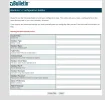
Já vi vários tutoriais de pessoas realizando a instalação; aparece essa página e, desde que introduzem o banco de dados, nome de usuário e senha, a instalação começa. Eu não consigo passar dessa página.
Por favor, se alguém já passou por esse tipo de problema no passado e puder me ajudar, eu agradeceria imensamente.
Ficarei no aguardo de toda ajuda que puderem me fornecer.
Mais abaixo envio o arquivo config.php para que vejam como o tenho configurado:
<?php
/*======================================================================*\
|| #################################################################### ||
|| # vBulletin Core Configuration # ||
|| # ---------------------------------------------------------------- # ||
|| # All PHP code in this file is 2000-2012 vBulletin Solutions Inc. # ||
|| # This file may not be redistributed in whole or significant part. # ||
|| # ---------------- VBULLETIN IS NOT FREE SOFTWARE ---------------- # ||
|| # vBulletin 5 Connect, The World's Leading Community Software | vBulletin License Agreement # ||
|| #################################################################### ||
\*======================================================================*/
/*----------------------------------------------------------------------*\
| ****** NOTE REGARDING THE VARIABLES IN THIS FILE ****** |
+------------------------------------------------------------------------+
| If you get any errors while attempting to connect to MySQL, you will |
| need to email your webhost because we cannot tell you the correct |
| values for the variables in this file. |
| |
| When making changes to the file, the edit should always be to the |
| right of the = sign between the single quotes |
| Default: $config['MasterServer']['username'] = 'root'; |
| Example: $config['MasterServer']['username'] = 'myuser'; GOOD! |
| Example: $config['MasterServer']['myuser'] = 'root'; BAD! |
\*----------------------------------------------------------------------*/
// ****** DATABASE TYPE ******
// This is the type of the database server on which your vBulletin database
// will be located. Valid options are mysql and mysqli, for slave support add
// _slave to the end of the database class.
// Try to use mysqli if you are using PHP 5 and MySQL 4.1+
// WARNING: As of PHP 5.5.0 mysql library support is depricated. So if you are using PHP >= 5.5.0 use mysqli
$config['Database']['dbtype'] = 'mysqli';
// ****** DATABASE NAME ******
// This is the name of the database where your vBulletin will be located.
// This must be created by your webhost.
$config['Database']['dbname'] = 'hispano1_lgcr';
// ****** TABLE PREFIX ******
// Prefix that your vBulletin tables have in the database.
$config['Database']['tableprefix'] = '';
// ****** TECHNICAL EMAIL ADDRESS ******
// If any database errors occur, they will be emailed to the address specified here.
// Leave this blank to not send any emails when there is a database error.
$config['Database']['technicalemail'] = 'alexan2565@hotmail.com';
// ****** MASTER DATABASE SERVER NAME AND PORT ******
// This is the hostname or IP address and port of the database server.
// If you are unsure of what to put here, leave the default values.
//
// Note: If you are using IIS 7+ and MySQL is on the same machine, you
// need to use 127.0.0.1 instead of localhost
$config['MasterServer']['servername'] = 'localhost';
$config['MasterServer']['port'] = 3306;
// ****** MASTER DATABASE USERNAME & PASSWORD ******
// This is the username and password you use to access MySQL.
// These must be obtained through your webhost.
$config['MasterServer']['username'] = 'hispano1_dock1535';
$config['MasterServer']['password'] = 'star1515';
// ****** MASTER DATABASE PERSISTENT CONNECTIONS ******
// This option allows you to turn persistent connections to MySQL on or off.
// The difference in performance is negligible for all but the largest boards.
// If you are unsure what this should be, leave it off. (0 = off; 1 = on)
$config['MasterServer']['usepconnect'] = 0;
// ****** SLAVE DATABASE CONFIGURATION ******
// If you have multiple database backends, this is the information for your slave
// server. If you are not 100% sure you need to fill in this information,
// do not change any of the values here.
$config['SlaveServer']['servername'] = '';
$config['SlaveServer']['port'] = 3306;
$config['SlaveServer']['username'] = '';
$config['SlaveServer']['password'] = '';
$config['SlaveServer']['usepconnect'] = 0;
// ****** PATH TO ADMIN & MODERATOR CONTROL PANELS ******
// This setting allows you to change the name of the folders that the admin and
// moderator control panels reside in. You may wish to do this for security purposes.
// Please note that if you change the name of the directory here, you will still need
// to manually change the name of the directory on the server.
$config['Misc']['admincpdir'] = 'admincp';
$config['Misc']['modcpdir'] = 'modcp';
// Prefix that all vBulletin cookies will have
// Keep this short and only use numbers and letters, i.e. 1-9 and a-Z
$config['Misc']['cookieprefix'] = 'bb';
// ******** FULL PATH TO FORUMS DIRECTORY ******
// On a few systems it may be necessary to input the full path to your forums directory
// for vBulletin to function normally. You can ignore this setting unless vBulletin
// tells you to fill this in. Do not include a trailing slash!
// Example Unix:
// $config['Misc']['forumpath'] = '/home/users/public_html/forums';
// Example Win32:
// $config['Misc']['forumpath'] = 'c:\program files\apache group\apache\htdocs\vb3';
$config['Misc']['forumpath'] = '';
// ******** FRONTEND (SITE) URL ******
// On a few systems it may be necessary to input the base url.
// This should be the same setting as $config['baseurl'] in the frontend config file
// You do not need to fill this in unless instructed by vBulletin Support.
// Do not include a trailing slash.
// Example: $config['Misc']['baseurl'] = 'http://www.mysite.comt/forums';
$config['Misc']['baseurl'] = '';
// ****** USERS WITH ADMIN LOG VIEWING PERMISSIONS ******
// The users specified here will be allowed to view the admin log in the control panel.
// Users must be specified by *ID number* here. To obtain a user's ID number,
// view their profile via the control panel. If this is a new installation, leave
// the first user created will have a user ID of 1. Seperate each userid with a comma.
$config['SpecialUsers']['canviewadminlog'] = '1';
// ****** USERS WITH ADMIN LOG PRUNING PERMISSIONS ******
// The users specified here will be allowed to remove ("prune") entries from the admin
// log. See the above entry for more information on the format.
$config['SpecialUsers']['canpruneadminlog'] = '1';
// ****** USERS WITH QUERY RUNNING PERMISSIONS ******
// The users specified here will be allowed to run queries from the control panel.
// See the above entries for more information on the format.
// Please note that the ability to run queries is quite powerful. You may wish
// to remove all user IDs from this list for security reasons.
$config['SpecialUsers']['canrunqueries'] = '';
// ****** UNDELETABLE / UNALTERABLE USERS ******
// The users specified here will not be deletable or alterable from the control panel by any users.
// To specify more than one user, separate userids with commas.
$config['SpecialUsers']['undeletableusers'] = '';
// ****** SUPER ADMINISTRATORS ******
// The userids specified below will have permission to access all areas of vBulletin 5.
// Note that this is different to vB3 & vB4 where they only had extra permissions in the
// Admin Control Panel. Be very careful who you grant this super power to.
// The name of this setting has changed from superadministrator to superadmins.
// This is to avoid the accidental granting of this permission when using older config files.
$config['SpecialUsers']['superadmins'] = '1';
// ****** CACHE CONFIGURATION *****
// Here you can configure different methods for caching items.
// The following are the cacheing classes that can be used.
// vB_Cache_Db - This setting stores the data in the database
// vB_Cache_APC - This setting stores the data in APC
// vB_Cache_Memcached - This stores the data in memcache
// vB_Cache_Memory - This setting uses php's memory while a page is being generated.
// Each cache area can use its own cache type.
$config['Cache']['class'][0] = 'vB_Cache_Db'; //regular cache
$config['Cache']['class'][1] = 'vB_Cache_Memory'; //fastest cache
$config['Cache']['class'][2] = 'vB_Cache_Db'; //largest cache and longest life.
// Cache options are
// vB_Cache_Memory fastest but doesn't survive a page load.
// vB_Cache_Db significant speed improvement and available to everyone.
// vB_Cache_Filesystem good performance, reduces traffic and load on db server. Not available to everyone-
// your web server must be able to write to the file system.
// vB_Cache_Memcached excellent performance but usually only available to dedicated or virtual hosted sites.
// vB_Cache_APC excellent performance but only available to those with APC installed, and on a single web server.
// vB_Cache_XCache excellent performance but only available to those with XCache installed, and on a single web server.
//Fast DS Configuration Options
// $config['fastDS'] = true; // Use to enable or disable fastDS (true/false).
// $config['fastDSType'] = 'APC'; // Storage Type, at this time APC is the only option.
// $config['fastDSPrefix'] = ''; // Prefix to prevent collisions on shared systems. Defaults to datastore prefix.
//Note that if you use the same cache type for this and fast or large cache, and the same prefix, you may have conflicts.
// $config['fastDSLimit'] = 6000000; // Limits the amount of memory consumed, in bytes
// ******** FILESYSTEM CACHE CONFIGURATION ******
//If you use filesystem cache you MUST uncomment the line below.
//set the path to somewher writeable by the web server process. This location must already exist. Please put
// this somewhere outside the document root. Otherwise you have just created a serious security issue.
//Don't include the final '/'
//$config['Cache']['fileCachePath'] = '/valid/writeable/for/my/webserver';
// ****** DATASTORE CACHE CONFIGURATION *****
// Here you can configure different methods for caching datastore items.
// You may need to clear this cache after installing/upgrading. You can do this either
// in the control panel (Maintenance) or by restarting the web server.
// vB_Datastore_Filecache - to use includes/datastore/datastore_cache.php
// vB_Datastore_APC - to use APC
// vB_Datastore_XCache - to use XCache
// vB_Datastore_WinCache - to use WinCache
// vB_Datastore_Memcached - to use a Memcache server, more configuration below
// $config['Datastore']['class'] = 'vB_Datastore_Filecache';
//if you use Filecache you can accept the default location, or better
// to uncomment the next line and set a location
// $config['Misc']['datastorepath'] = '/valid/writeable/for/my/webserver';
// or if you have set $config['Cache']['fileCachePath' above you can do nothing and
// it will use that location.
// ******** DATASTORE PREFIX ******
// If you are using a PHP Caching system (APC, XCache, eAccelerator, WinCache) with more
// than one set of forums installed on your host, you *may* need to use a prefix
// so that they do not try to use the same variable within the cache.
// This works in a similar manner to the database table prefix.
// $config['Datastore']['prefix'] = '';
// It is also necessary to specify the hostname or IP address and the port the server is listening on
/*
$config['Datastore']['class'] = 'vB_Datastore_Memcached';
$i = 0;
// First Server
$i++;
$config['Misc']['memcacheserver'][$i] = '127.0.0.1';
$config['Misc']['memcacheport'][$i] = 11211;
$config['Misc']['memcachepersistent'][$i] = true;
$config['Misc']['memcacheweight'][$i] = 1;
$config['Misc']['memcachetimeout'][$i] = 1;
$config['Misc']['memcacheretry_interval'][$i] = 15;
*/
//If you are using Memcache you should can set a prefix. This is needed only if the memcache server is shared. If dedicated you don't need it.
$config['Cache']['memcacheprefix'] = '';
//Please refer to the documentation in do_not_upload/sphinx_install_unix.txt or do_not_upload/sphinx_install_windows.txt
//for how to configure sphinx to work with vBulletin
//$config['Misc']['sphinx_host'] = '127.0.0.1';
//$config['Misc']['sphinx_port'] = '9306';
//$config['Misc']['sphinx_path'] = '<shpinx_root>'; //no trailing slash
//$config['Misc']['sphinx_config'] = $config['Misc']['sphinx_path'] . '/etc/vbulletin_sphinx.conf';
// ****** The following options are only needed in special cases ******
// ****** MySQLI OPTIONS *****
// When using MySQL 4.1+, MySQLi should be used to connect to the database.
// If you need to set the default connection charset because your database
// is using a charset other than latin1, you can set the charset here.
// If you don't set the charset to be the same as your database, you
// may receive collation errors. Ignore this setting unless you
// are sure you need to use it.
// $config['Mysqli']['charset'] = 'utf8';
// Optionally, PHP can be instructed to set connection parameters by
// reading from the file named in 'ini_file'. Please use a full path to
// the file.
// Example:
// $config['Mysqli']['ini_file'] = 'c:\program files\MySQL\MySQL Server 4.1\my.ini';
$config['Mysqli']['ini_file'] = '';
// ******** IMAGE PROCESSING OPTIONS ********
// Images that exceed either dimension below will not be resized by vBulletin.
// If you need to resize larger images, alter these settings.
$config['Misc']['maxwidth'] = 4608;
$config['Misc']['maxheight'] = 3456;
// ******** SPECIAL SETTINGS ********
// The following are settings/permissions that are not normally used but
// are here for reference. Please be careful using them. Do not enable or
// uncomment without understanding what they do first.
// This allows you to disable modifications and extensions to the software.
// If your site is not functioning well after installing or using a third
// party modification, please enable this.
// define("DISABLE_HOOKS", true);
// This allows you to shut down all mail that is being sent by vBulletin.
// This is useful for test environments
// define("DISABLE_MAIL", true);
// This allows you to enter debug mode, which is for support or development
// to help understand how pages are built. This should NEVER be enabled in
// a live environment.
// $config['Misc']['debug'] = true;
// This enables debug logging. The debuglogger is controlled from the
// file core/includes/xml/logger.xml. This is safe to run on a live
// environment, assuming the log location is secure, however it may
// impact peformance to have the logging on.
// $config['Misc']['debuglogging'] = true;
// The ports in this array will not be appended to generated urls
// This is useful if you run vB on a non-standard port, e.g. with Varnish in front
// $config['Misc']['backendports'] = array();
// A list of allowed ports for uploading.
// Other than ports 80 and 443, upload requests through any other ports
// will be blocked, unless specified in the array.
// Comma separated array of integers, Ex. array(8080, 3128);
// $config['Misc']['uploadallowedports'] = array();
/*======================================================================*\
|| ####################################################################
|| # Downloaded: 00:00, Thur Oct 15th 2015
|| # CVS: $RCSfile$ - $Revision: 82643 $
|| ####################################################################
\*======================================================================*/
Depois de um bom tempo sem operar o software vBulletin, decidi começar a operá-lo novamente e comprei o vBulletin 5. Começo dizendo isso pelo fato de não ser tão novato; sei como instalar o vBulletin perfeitamente, pois no passado fazia isso constantemente.
Agora não sei se algo mudou na configuração do config.php. Eu renomeei o config.php.new para config.php, depois inseri dentro o nome do banco de dados, nome de usuário e senha, ah, também meu e-mail. Depois, executei o script http://www.mywebsite.com/core/install/install.php e aparece a seguinte tela:
Depois de aparecer essa página, eu ainda não tinha configurado o config.php.new, então o renomeei para config.php e, como disse anteriormente, coloquei o nome do banco de dados, nome de usuário, senha e meu e-mail. Depois salvei e aparece a mesma página dizendo uma mensagem com letra vermelha:
Já vi vários tutoriais de pessoas realizando a instalação; aparece essa página e, desde que introduzem o banco de dados, nome de usuário e senha, a instalação começa. Eu não consigo passar dessa página.
Por favor, se alguém já passou por esse tipo de problema no passado e puder me ajudar, eu agradeceria imensamente.
Ficarei no aguardo de toda ajuda que puderem me fornecer.
Mais abaixo envio o arquivo config.php para que vejam como o tenho configurado:
<?php
/*======================================================================*\
|| #################################################################### ||
|| # vBulletin Core Configuration # ||
|| # ---------------------------------------------------------------- # ||
|| # All PHP code in this file is 2000-2012 vBulletin Solutions Inc. # ||
|| # This file may not be redistributed in whole or significant part. # ||
|| # ---------------- VBULLETIN IS NOT FREE SOFTWARE ---------------- # ||
|| # vBulletin 5 Connect, The World's Leading Community Software | vBulletin License Agreement # ||
|| #################################################################### ||
\*======================================================================*/
/*----------------------------------------------------------------------*\
| ****** NOTE REGARDING THE VARIABLES IN THIS FILE ****** |
+------------------------------------------------------------------------+
| If you get any errors while attempting to connect to MySQL, you will |
| need to email your webhost because we cannot tell you the correct |
| values for the variables in this file. |
| |
| When making changes to the file, the edit should always be to the |
| right of the = sign between the single quotes |
| Default: $config['MasterServer']['username'] = 'root'; |
| Example: $config['MasterServer']['username'] = 'myuser'; GOOD! |
| Example: $config['MasterServer']['myuser'] = 'root'; BAD! |
\*----------------------------------------------------------------------*/
// ****** DATABASE TYPE ******
// This is the type of the database server on which your vBulletin database
// will be located. Valid options are mysql and mysqli, for slave support add
// _slave to the end of the database class.
// Try to use mysqli if you are using PHP 5 and MySQL 4.1+
// WARNING: As of PHP 5.5.0 mysql library support is depricated. So if you are using PHP >= 5.5.0 use mysqli
$config['Database']['dbtype'] = 'mysqli';
// ****** DATABASE NAME ******
// This is the name of the database where your vBulletin will be located.
// This must be created by your webhost.
$config['Database']['dbname'] = 'hispano1_lgcr';
// ****** TABLE PREFIX ******
// Prefix that your vBulletin tables have in the database.
$config['Database']['tableprefix'] = '';
// ****** TECHNICAL EMAIL ADDRESS ******
// If any database errors occur, they will be emailed to the address specified here.
// Leave this blank to not send any emails when there is a database error.
$config['Database']['technicalemail'] = 'alexan2565@hotmail.com';
// ****** MASTER DATABASE SERVER NAME AND PORT ******
// This is the hostname or IP address and port of the database server.
// If you are unsure of what to put here, leave the default values.
//
// Note: If you are using IIS 7+ and MySQL is on the same machine, you
// need to use 127.0.0.1 instead of localhost
$config['MasterServer']['servername'] = 'localhost';
$config['MasterServer']['port'] = 3306;
// ****** MASTER DATABASE USERNAME & PASSWORD ******
// This is the username and password you use to access MySQL.
// These must be obtained through your webhost.
$config['MasterServer']['username'] = 'hispano1_dock1535';
$config['MasterServer']['password'] = 'star1515';
// ****** MASTER DATABASE PERSISTENT CONNECTIONS ******
// This option allows you to turn persistent connections to MySQL on or off.
// The difference in performance is negligible for all but the largest boards.
// If you are unsure what this should be, leave it off. (0 = off; 1 = on)
$config['MasterServer']['usepconnect'] = 0;
// ****** SLAVE DATABASE CONFIGURATION ******
// If you have multiple database backends, this is the information for your slave
// server. If you are not 100% sure you need to fill in this information,
// do not change any of the values here.
$config['SlaveServer']['servername'] = '';
$config['SlaveServer']['port'] = 3306;
$config['SlaveServer']['username'] = '';
$config['SlaveServer']['password'] = '';
$config['SlaveServer']['usepconnect'] = 0;
// ****** PATH TO ADMIN & MODERATOR CONTROL PANELS ******
// This setting allows you to change the name of the folders that the admin and
// moderator control panels reside in. You may wish to do this for security purposes.
// Please note that if you change the name of the directory here, you will still need
// to manually change the name of the directory on the server.
$config['Misc']['admincpdir'] = 'admincp';
$config['Misc']['modcpdir'] = 'modcp';
// Prefix that all vBulletin cookies will have
// Keep this short and only use numbers and letters, i.e. 1-9 and a-Z
$config['Misc']['cookieprefix'] = 'bb';
// ******** FULL PATH TO FORUMS DIRECTORY ******
// On a few systems it may be necessary to input the full path to your forums directory
// for vBulletin to function normally. You can ignore this setting unless vBulletin
// tells you to fill this in. Do not include a trailing slash!
// Example Unix:
// $config['Misc']['forumpath'] = '/home/users/public_html/forums';
// Example Win32:
// $config['Misc']['forumpath'] = 'c:\program files\apache group\apache\htdocs\vb3';
$config['Misc']['forumpath'] = '';
// ******** FRONTEND (SITE) URL ******
// On a few systems it may be necessary to input the base url.
// This should be the same setting as $config['baseurl'] in the frontend config file
// You do not need to fill this in unless instructed by vBulletin Support.
// Do not include a trailing slash.
// Example: $config['Misc']['baseurl'] = 'http://www.mysite.comt/forums';
$config['Misc']['baseurl'] = '';
// ****** USERS WITH ADMIN LOG VIEWING PERMISSIONS ******
// The users specified here will be allowed to view the admin log in the control panel.
// Users must be specified by *ID number* here. To obtain a user's ID number,
// view their profile via the control panel. If this is a new installation, leave
// the first user created will have a user ID of 1. Seperate each userid with a comma.
$config['SpecialUsers']['canviewadminlog'] = '1';
// ****** USERS WITH ADMIN LOG PRUNING PERMISSIONS ******
// The users specified here will be allowed to remove ("prune") entries from the admin
// log. See the above entry for more information on the format.
$config['SpecialUsers']['canpruneadminlog'] = '1';
// ****** USERS WITH QUERY RUNNING PERMISSIONS ******
// The users specified here will be allowed to run queries from the control panel.
// See the above entries for more information on the format.
// Please note that the ability to run queries is quite powerful. You may wish
// to remove all user IDs from this list for security reasons.
$config['SpecialUsers']['canrunqueries'] = '';
// ****** UNDELETABLE / UNALTERABLE USERS ******
// The users specified here will not be deletable or alterable from the control panel by any users.
// To specify more than one user, separate userids with commas.
$config['SpecialUsers']['undeletableusers'] = '';
// ****** SUPER ADMINISTRATORS ******
// The userids specified below will have permission to access all areas of vBulletin 5.
// Note that this is different to vB3 & vB4 where they only had extra permissions in the
// Admin Control Panel. Be very careful who you grant this super power to.
// The name of this setting has changed from superadministrator to superadmins.
// This is to avoid the accidental granting of this permission when using older config files.
$config['SpecialUsers']['superadmins'] = '1';
// ****** CACHE CONFIGURATION *****
// Here you can configure different methods for caching items.
// The following are the cacheing classes that can be used.
// vB_Cache_Db - This setting stores the data in the database
// vB_Cache_APC - This setting stores the data in APC
// vB_Cache_Memcached - This stores the data in memcache
// vB_Cache_Memory - This setting uses php's memory while a page is being generated.
// Each cache area can use its own cache type.
$config['Cache']['class'][0] = 'vB_Cache_Db'; //regular cache
$config['Cache']['class'][1] = 'vB_Cache_Memory'; //fastest cache
$config['Cache']['class'][2] = 'vB_Cache_Db'; //largest cache and longest life.
// Cache options are
// vB_Cache_Memory fastest but doesn't survive a page load.
// vB_Cache_Db significant speed improvement and available to everyone.
// vB_Cache_Filesystem good performance, reduces traffic and load on db server. Not available to everyone-
// your web server must be able to write to the file system.
// vB_Cache_Memcached excellent performance but usually only available to dedicated or virtual hosted sites.
// vB_Cache_APC excellent performance but only available to those with APC installed, and on a single web server.
// vB_Cache_XCache excellent performance but only available to those with XCache installed, and on a single web server.
//Fast DS Configuration Options
// $config['fastDS'] = true; // Use to enable or disable fastDS (true/false).
// $config['fastDSType'] = 'APC'; // Storage Type, at this time APC is the only option.
// $config['fastDSPrefix'] = ''; // Prefix to prevent collisions on shared systems. Defaults to datastore prefix.
//Note that if you use the same cache type for this and fast or large cache, and the same prefix, you may have conflicts.
// $config['fastDSLimit'] = 6000000; // Limits the amount of memory consumed, in bytes
// ******** FILESYSTEM CACHE CONFIGURATION ******
//If you use filesystem cache you MUST uncomment the line below.
//set the path to somewher writeable by the web server process. This location must already exist. Please put
// this somewhere outside the document root. Otherwise you have just created a serious security issue.
//Don't include the final '/'
//$config['Cache']['fileCachePath'] = '/valid/writeable/for/my/webserver';
// ****** DATASTORE CACHE CONFIGURATION *****
// Here you can configure different methods for caching datastore items.
// You may need to clear this cache after installing/upgrading. You can do this either
// in the control panel (Maintenance) or by restarting the web server.
// vB_Datastore_Filecache - to use includes/datastore/datastore_cache.php
// vB_Datastore_APC - to use APC
// vB_Datastore_XCache - to use XCache
// vB_Datastore_WinCache - to use WinCache
// vB_Datastore_Memcached - to use a Memcache server, more configuration below
// $config['Datastore']['class'] = 'vB_Datastore_Filecache';
//if you use Filecache you can accept the default location, or better
// to uncomment the next line and set a location
// $config['Misc']['datastorepath'] = '/valid/writeable/for/my/webserver';
// or if you have set $config['Cache']['fileCachePath' above you can do nothing and
// it will use that location.
// ******** DATASTORE PREFIX ******
// If you are using a PHP Caching system (APC, XCache, eAccelerator, WinCache) with more
// than one set of forums installed on your host, you *may* need to use a prefix
// so that they do not try to use the same variable within the cache.
// This works in a similar manner to the database table prefix.
// $config['Datastore']['prefix'] = '';
// It is also necessary to specify the hostname or IP address and the port the server is listening on
/*
$config['Datastore']['class'] = 'vB_Datastore_Memcached';
$i = 0;
// First Server
$i++;
$config['Misc']['memcacheserver'][$i] = '127.0.0.1';
$config['Misc']['memcacheport'][$i] = 11211;
$config['Misc']['memcachepersistent'][$i] = true;
$config['Misc']['memcacheweight'][$i] = 1;
$config['Misc']['memcachetimeout'][$i] = 1;
$config['Misc']['memcacheretry_interval'][$i] = 15;
*/
//If you are using Memcache you should can set a prefix. This is needed only if the memcache server is shared. If dedicated you don't need it.
$config['Cache']['memcacheprefix'] = '';
//Please refer to the documentation in do_not_upload/sphinx_install_unix.txt or do_not_upload/sphinx_install_windows.txt
//for how to configure sphinx to work with vBulletin
//$config['Misc']['sphinx_host'] = '127.0.0.1';
//$config['Misc']['sphinx_port'] = '9306';
//$config['Misc']['sphinx_path'] = '<shpinx_root>'; //no trailing slash
//$config['Misc']['sphinx_config'] = $config['Misc']['sphinx_path'] . '/etc/vbulletin_sphinx.conf';
// ****** The following options are only needed in special cases ******
// ****** MySQLI OPTIONS *****
// When using MySQL 4.1+, MySQLi should be used to connect to the database.
// If you need to set the default connection charset because your database
// is using a charset other than latin1, you can set the charset here.
// If you don't set the charset to be the same as your database, you
// may receive collation errors. Ignore this setting unless you
// are sure you need to use it.
// $config['Mysqli']['charset'] = 'utf8';
// Optionally, PHP can be instructed to set connection parameters by
// reading from the file named in 'ini_file'. Please use a full path to
// the file.
// Example:
// $config['Mysqli']['ini_file'] = 'c:\program files\MySQL\MySQL Server 4.1\my.ini';
$config['Mysqli']['ini_file'] = '';
// ******** IMAGE PROCESSING OPTIONS ********
// Images that exceed either dimension below will not be resized by vBulletin.
// If you need to resize larger images, alter these settings.
$config['Misc']['maxwidth'] = 4608;
$config['Misc']['maxheight'] = 3456;
// ******** SPECIAL SETTINGS ********
// The following are settings/permissions that are not normally used but
// are here for reference. Please be careful using them. Do not enable or
// uncomment without understanding what they do first.
// This allows you to disable modifications and extensions to the software.
// If your site is not functioning well after installing or using a third
// party modification, please enable this.
// define("DISABLE_HOOKS", true);
// This allows you to shut down all mail that is being sent by vBulletin.
// This is useful for test environments
// define("DISABLE_MAIL", true);
// This allows you to enter debug mode, which is for support or development
// to help understand how pages are built. This should NEVER be enabled in
// a live environment.
// $config['Misc']['debug'] = true;
// This enables debug logging. The debuglogger is controlled from the
// file core/includes/xml/logger.xml. This is safe to run on a live
// environment, assuming the log location is secure, however it may
// impact peformance to have the logging on.
// $config['Misc']['debuglogging'] = true;
// The ports in this array will not be appended to generated urls
// This is useful if you run vB on a non-standard port, e.g. with Varnish in front
// $config['Misc']['backendports'] = array();
// A list of allowed ports for uploading.
// Other than ports 80 and 443, upload requests through any other ports
// will be blocked, unless specified in the array.
// Comma separated array of integers, Ex. array(8080, 3128);
// $config['Misc']['uploadallowedports'] = array();
/*======================================================================*\
|| ####################################################################
|| # Downloaded: 00:00, Thur Oct 15th 2015
|| # CVS: $RCSfile$ - $Revision: 82643 $
|| ####################################################################
\*======================================================================*/


